

Using Codex in Custom Excel 365 Development
Codex Desktop didn’t just write the code. It built the entire Excel solution
~ But we have a long way to go ~

The Codex Desktop application did everything the programmer would normally do, if they knew how. Codex created a solution that many Excel programmers cannot. In about 5-10 minutes.
BUT, we are not there yet.
What did Codex Develop?
- Created three Excel Tables
- Created two Queries.
- Converted a Table into a Self-Referencing Query.
- Created the M Code for Joins and Merges.
- Loaded the Query to Sheet, deleting the original Excel Table.
- Added mock-records.
- Wrote VBA to test the file.
- Fully tested and corrected the file.
- Removed the VBA.
- Saved the file.
But we are getting there quickly.
In this post we say very little, we will convey the message via videos and images, on the tests we are running.
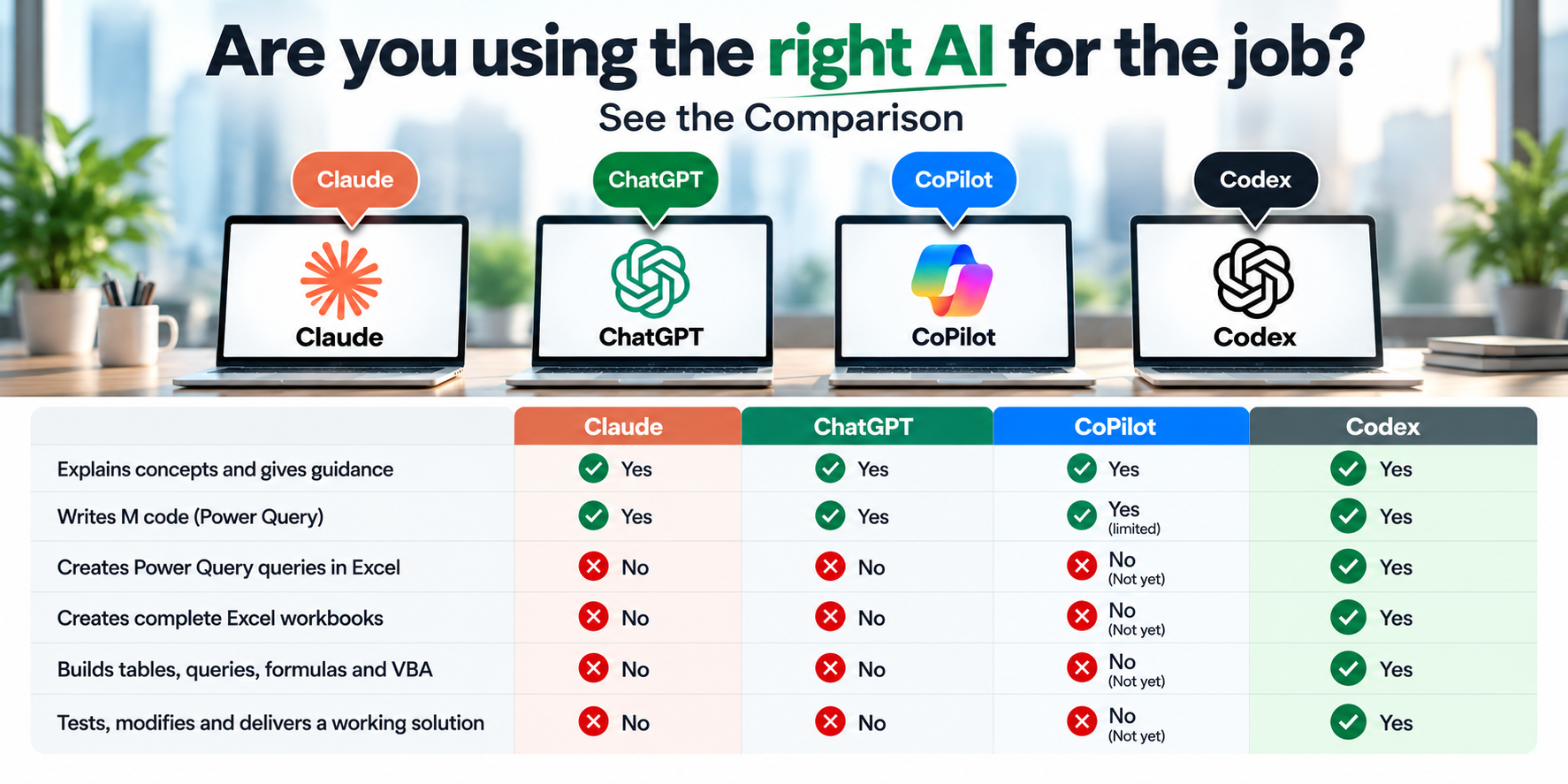
- Can you do what Codex is doing.
- Can Claude do what Codex is doing?
- Can ChatGPT do what Codex is doing?
- Finally, can CoPilot do what Codex is doing?
- If so, how long would it take you?
No, no, no, and no. Not yet.
Codex created the file below, including two queries, a join, and an append, on the two Tables it created.
The file above came from a single prompt, outside of Excel; this changes things considerably.
ChatGPT’s Codex
I am really confused as to why no one, and I mean no one talks about Codex on LinkedIn. Everyone talks about Claude, and for good reason; Claude is great at many things. Almost everyone I know uses Claude.
Now they are talking about CoPilot Beta, as it has enhanced Power Query capabilities, but not Codex.
But based on the tests I have run, NOTHING TOUCHES CODEX. Nothing.
So why don’t more people know about it or use Codex? I think Claude and CoPilot have so much click-bait on LI that Codex just gets buried, if it is covered at all.
I have done a lot of research, a lot of testing, as this is my new passion.

But if you are a developer, once you try Codex Desktop, you will stop using the other apps, for now.

Testing Custom Excel Development with Codex Desktop
Here we show just how much Codex can do with a simple prompt. Nothing too complex in terms of the level of details, rather here we focus on specific difficult topics, such as having Codex create a new file with a self-referencing query.

These aren’t simple Excel VLOOKUP tests. These are some of the most difficult Excel 365 w/ Power Query development techniques—and Codex is doing them in minutes.
But we have a long way to go; these are small tests.

Test 1: Codex Creates a New Workbook with Self-Referencing Query
Advanced use of Power Query
- Why did I choose to run this series of Codex tests: David asked can ChatGPT create a self-referencing query. David is one of the programmers that I know that uses SRQ in most of their Excel database solutions.
- I knew that the ChatGPT Excel Add-in could create the Tables, and it could provide the M Code, but I also knew that it could not create the actual queries.
- Note: When I use either Codex or ChatGPT Work to create an Excel file, they usually need repairs on open. So I use the Excel Add-In instead.
I had not tried giving the Codex Desktop app a prompt before, so when I did, I was SHOCKED; it took over my computer, and it created the file from scratch, and then, well, it tested its own work. It worked; Codex created Power Queries, tested them, and wrote vba.
So now I want to know, what can the Codex Desktop app really do?
The Video:
The Results:

Codex Actions:

Codex Prompt:
Codex Created Power Query

If Codex can do this, what else can it do? Let’s find out.
Test#2: Create Self-Referencing Query Windows ID xlsm


The Results

The Queries

Self-Referencing Query

The M Code

The VBA

It worked.
Test#3: Create Self-Referencing Query and Populate Power Pivot Directly via External Data
Now this is the real hard stuff. Power Pivot (BI) in Excel.
Compare to the recent CoPilot Beta version
ChatGPT in Excel 365


Leave a Reply